 Rafi Athallah
1831 lines
47 KiB
Markdown
Executable File
1831 lines
47 KiB
Markdown
Executable File
# Internify API Documentation
|
|
|
|
[](http://expressjs.com/)
|
|
|
|
Backend API untuk Website Penerimaan Magang HUMIC Engineering - Dibangun dengan Express.js, Prisma ORM, dan MySQL.
|
|
|
|
---
|
|
|
|
## 📑 Table of Contents
|
|
|
|
1. [Introduction](#introduction)
|
|
2. [Quick Start](#-quick-start)
|
|
- [Prerequisites](#prerequisites)
|
|
- [Installation](#installation)
|
|
- [Environment Setup](#environment-setup)
|
|
- [Database Setup](#database-setup)
|
|
- [Running the Server](#running-the-server)
|
|
3. [Project Structure](#-project-structure)
|
|
4. [Architecture](#-architecture)
|
|
- [Technology Stack](#technology-stack)
|
|
- [Module Architecture](#module-architecture-4-layer-pattern)
|
|
- [Request Flow](#request-flow)
|
|
5. [Development Guide](#-development-guide)
|
|
- [Creating a New Module](#creating-a-new-module)
|
|
- [Using Wrapper Functions](#using-wrapper-functions)
|
|
- [Validation with Joi](#validation-with-joi)
|
|
- [File Upload Handling](#file-upload-handling)
|
|
6. [API Documentation](#-api-documentation)
|
|
7. [Testing](#-testing)
|
|
8. [Deployment](#-deployment)
|
|
9. [Contributing](#-contributing)
|
|
10. [Troubleshooting](#-troubleshooting)
|
|
|
|
---
|
|
|
|
## Introduction
|
|
|
|
Project intern HUMIC Batch 4 & 5 - Website Penerimaan Magang
|
|
|
|
**Framework:** [Express.js](https://expressjs.com/)
|
|
**ORM:** [Prisma](https://www.prisma.io/)
|
|
**Database:** MySQL
|
|
**Authentication:** JWT (RS256)
|
|
|
|
### 👥 Development Team
|
|
|
|
**Team Humic Intern Batch 4**
|
|
|**Nama**| **Role** |
|
|
|:-------|:-----------:|
|
|
|REINHARD EFRAIM SITUMEANG |UI/UX WEBSITE|
|
|
|SHAFA SALMA PERMANA|UI/UX MOBILE|
|
|
|MUHAMMAD FARIED GUNAWAN|FRONT END DEVELOPER|
|
|
|YOHANES JANUARICO ANDIAWAN|BACK END DEVELOPER |
|
|
|REIHAN RAMADHANA ANWARI |BACK END DEVELOPER |
|
|
|DELKANO MARZUKI BERUTU|MOBILE DEVELOPER |
|
|
|
|
**Team Humic Intern Batch 5**
|
|
|**Nama**| **Role** |
|
|
|:-------|:-----------:|
|
|
|BILLY MARCELO |FRONTEND DEVELOPER|
|
|
|MAHESA BAGUS RADITYA |BACK END DEVELOPER|
|
|
|SASI AFRILIA |UI/UX WEBSITE|
|
|
|
|
**Team Humic Intern Batch 6**
|
|
|**Nama**| **Role** |
|
|
|:-------|:-----------:|
|
|
|MUHAMMAD RAFI ATHALLAH|BACK END DEVELOPER|
|
|
|MUHAMMAD ZHAFRAN ILHAM|BACK END DEVELOPER|
|
|
|KEMAS M. ARYADARY RASYAD|FRONT END DEVELOPER|
|
|
|ANOM AYU RADHASWASTI|UI/UX WEBSITE|
|
|
|
|
### 🗄️ Database Structure
|
|
|
|
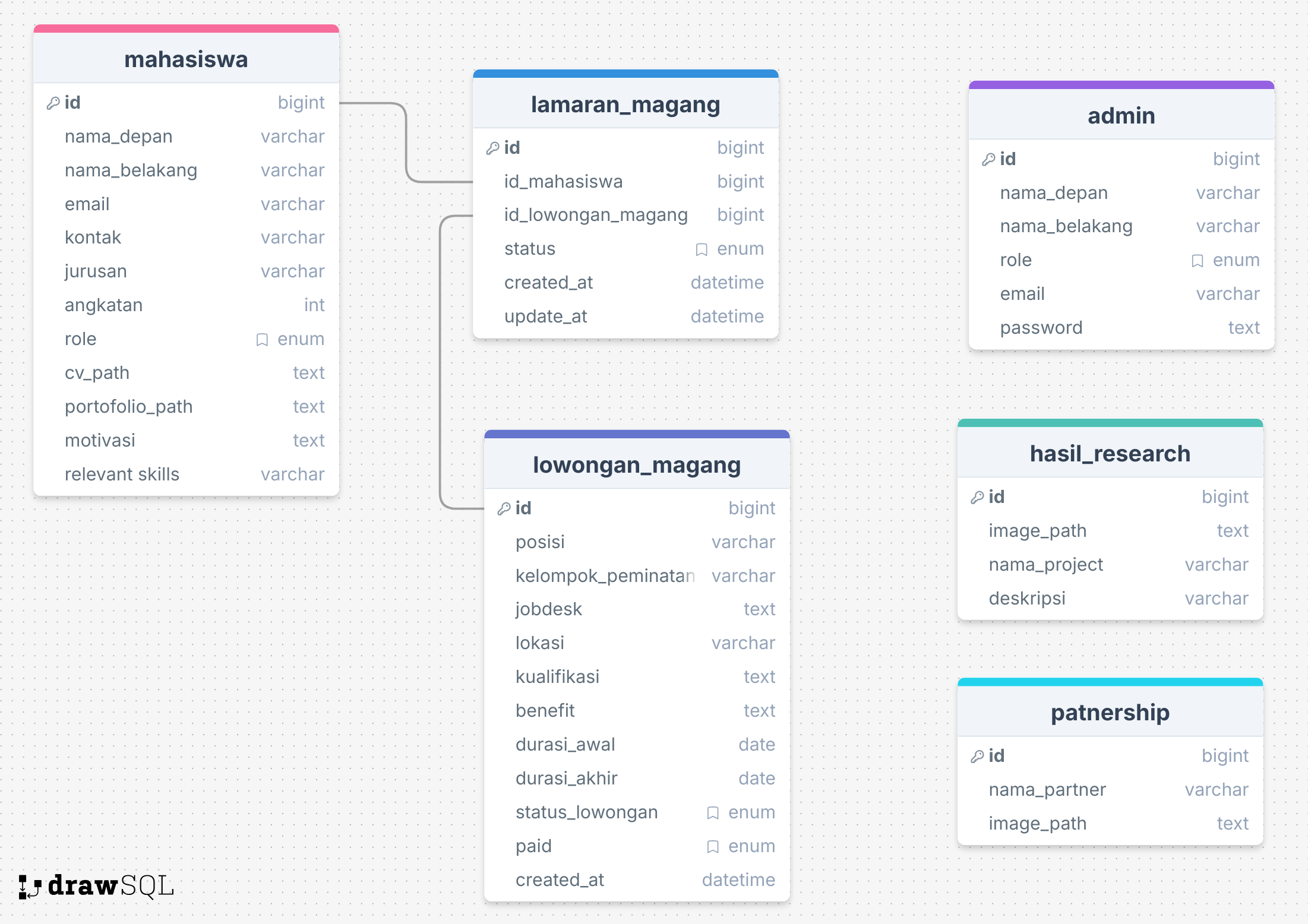
|
|
The database consists of the following tables:
|
|
|
|
1. **mahasiswa**: Menyimpan data lengkap mahasiswa yang mendaftar magang.
|
|
2. **admin**: Digunakan untuk login dan mengelola lowongan.
|
|
3. **lowongan_magang**: Informasi detail tentang posisi magang yang tersedia.
|
|
4. **lamaran_magang**: Data lamaran yang diajukan mahasiswa.
|
|
5. **hasil_research**: Menyimpan hasil riset proyek dari mahasiswa atau tim.
|
|
6. **partnership**: Data partner/institusi yang bekerja sama.
|
|
7. **faq**: Data pertanyaan dan jawaban yang sering ditanyakan (Frequently Asked Questions).
|
|
|
|
---
|
|
|
|
## 🚀 Quick Start
|
|
|
|
### Prerequisites
|
|
|
|
Pastikan Anda sudah menginstall:
|
|
|
|
- **Node.js** (v16 atau lebih tinggi)
|
|
- **npm** atau **yarn**
|
|
- **MySQL** (v8 atau lebih tinggi)
|
|
- **Git**
|
|
|
|
### Installation
|
|
|
|
#### 1. Clone Repository
|
|
|
|
```bash
|
|
git clone https://github.com/Ditrogen/backend-intern-humic.git
|
|
cd backend-intern-humic
|
|
```
|
|
|
|
#### 2. Install Dependencies
|
|
|
|
```bash
|
|
npm install
|
|
```
|
|
|
|
### Environment Setup
|
|
|
|
#### 3. Buat File .env
|
|
|
|
Salin file `.env.example` menjadi `.env`:
|
|
|
|
```bash
|
|
cp .env.example .env
|
|
```
|
|
|
|
#### 4. Konfigurasi Environment Variables
|
|
|
|
Edit file `.env` dan isi dengan konfigurasi Anda:
|
|
|
|
```env
|
|
# Database Configuration
|
|
DATABASE_URL="mysql://username:password@localhost:3306/internify_db"
|
|
|
|
# Server Configuration
|
|
PORT=9000
|
|
|
|
# Email Configuration (untuk notifikasi)
|
|
AUTH_EMAIL='your-email@gmail.com'
|
|
AUTH_PASSWORD='your-app-specific-password'
|
|
|
|
# JWT Configuration
|
|
JWT_PRIVATE_KEY=-----BEGIN RSA PRIVATE KEY-----\nYOUR_PRIVATE_KEY\n-----END RSA PRIVATE KEY-----
|
|
JWT_PUBLIC_KEY=-----BEGIN PUBLIC KEY-----\nYOUR_PUBLIC_KEY\n-----END PUBLIC KEY-----
|
|
|
|
# ReCaptcha Configuration
|
|
RECAPTCHA_SECRET_KEY=your-recaptcha-secret-key
|
|
RECAPTCHA_SITE_KEY=your-recaptcha-site-key
|
|
```
|
|
|
|
> **💡 Tips:** Untuk generate RSA key pair, gunakan OpenSSL:
|
|
>
|
|
> ```bash
|
|
> # Generate private key
|
|
> openssl genrsa -out private.pem 2048
|
|
> # Generate public key
|
|
> openssl rsa -in private.pem -pubout -out public.pem
|
|
> ```
|
|
|
|
### Database Setup
|
|
|
|
#### 5. Buat Database MySQL
|
|
|
|
```bash
|
|
mysql -u root -p
|
|
CREATE DATABASE internify_db;
|
|
EXIT;
|
|
```
|
|
|
|
#### 6. Generate Prisma Client
|
|
|
|
```bash
|
|
npx prisma generate
|
|
```
|
|
|
|
#### 7. Run Database Migration
|
|
|
|
```bash
|
|
npx prisma migrate dev
|
|
```
|
|
|
|
> Ini akan membuat semua tabel yang diperlukan berdasarkan schema Prisma.
|
|
|
|
#### 8. (Optional) Seed Database
|
|
|
|
Jika ada data seeder:
|
|
|
|
```bash
|
|
npx prisma db seed
|
|
```
|
|
|
|
### Running the Server
|
|
|
|
#### Development Mode
|
|
|
|
```bash
|
|
npm run dev
|
|
```
|
|
|
|
Server akan berjalan di `http://localhost:9000`
|
|
|
|
#### Production Mode
|
|
|
|
```bash
|
|
npm start
|
|
```
|
|
|
|
> **⚠️ Perhatian:**
|
|
>
|
|
> - Gunakan `npm run dev` untuk development
|
|
> - Gunakan `npm start` untuk production
|
|
|
|
### Testing the API
|
|
|
|
Setelah server berjalan, buka Swagger UI untuk testing:
|
|
|
|
```
|
|
http://localhost:9000/api-docs
|
|
```
|
|
|
|
> **📝 Note:** Swagger hanya tersedia jika `NODE_ENV` bukan `production` dan `SWAGGER_ENABLED` bernilai `true`
|
|
|
|
---
|
|
|
|
## 📚 Project Structure
|
|
|
|
```
|
|
backend-intern-humic/
|
|
├── prisma/
|
|
│ ├── schema.prisma # Prisma schema definition
|
|
│ ├── prisma.config.js # Prisma configuration
|
|
│ └── migrations/ # Database migrations
|
|
├── src/
|
|
│ ├── index.js # Main application entry point
|
|
│ ├── docs/
|
|
│ │ ├── swagger.js # Swagger/OpenAPI configuration
|
|
│ │ └── ERD.png # Entity Relationship Diagram
|
|
│ ├── helpers/
|
|
│ │ ├── db/ # Database connection (Prisma client)
|
|
│ │ ├── error/ # Custom error classes
|
|
│ │ ├── http-status/ # HTTP status codes
|
|
│ │ ├── infra/ # Infrastructure config
|
|
│ │ └── utils/ # Utility functions
|
|
│ │ ├── validator.js # Joi validation helpers
|
|
│ │ ├── wrapper.js # Response wrapper functions
|
|
│ │ └── fileHelper.js # File handling utilities
|
|
│ ├── middleware/
|
|
│ │ ├── multer.js # File upload configuration
|
|
│ │ ├── recaptcha.js # ReCaptcha verification
|
|
│ │ └── verifyJWT.js # JWT authentication
|
|
│ ├── modules/ # Feature modules (MVC pattern)
|
|
│ │ ├── admin/
|
|
│ │ │ ├── controllers/ # Handle HTTP requests
|
|
│ │ │ ├── services/ # Business logic
|
|
│ │ │ ├── repositories/ # Database operations
|
|
│ │ │ ├── models/ # Joi validation schemas
|
|
│ │ │ └── index.js # Module exports
|
|
│ │ ├── auth/
|
|
│ │ ├── batch/
|
|
│ │ ├── faq/
|
|
│ │ ├── feedback/
|
|
│ │ ├── hasilResearch/
|
|
│ │ ├── lamaranMagang/
|
|
│ │ ├── lowonganMagang/
|
|
│ │ ├── mahasiswa/
|
|
│ │ └── partnership/
|
|
│ ├── routes/ # API route definitions
|
|
│ │ ├── admin.routes.js
|
|
│ │ ├── auth.routes.js
|
|
│ │ ├── ...
|
|
│ └── uploads/ # File upload directory (development)
|
|
├── .env # Environment variables (not committed)
|
|
├── .env.example # Environment variables template
|
|
├── package.json # Node.js dependencies and scripts
|
|
├── vercel.json # Vercel deployment configuration
|
|
└── README.md # This file
|
|
```
|
|
|
|
### Folder Explanation
|
|
|
|
| Folder/File | Purpose |
|
|
| ----------------- | ----------------------------------------------- |
|
|
| `prisma/` | Prisma ORM schema, config, dan migrations |
|
|
| `src/index.js` | Entry point Express application |
|
|
| `src/helpers/` | Utility functions, error classes, DB connection |
|
|
| `src/middleware/` | Express middleware (auth, upload, validation) |
|
|
| `src/modules/` | Feature modules following 4-layer architecture |
|
|
| `src/routes/` | API endpoint definitions |
|
|
| `.env` | Environment variables (credentials, config) |
|
|
| `vercel.json` | Serverless deployment configuration |
|
|
|
|
---
|
|
|
|
## 🏛️ Architecture
|
|
|
|
### Technology Stack
|
|
|
|
| Technology | Version | Purpose |
|
|
| -------------- | ------- | -------------------------------- |
|
|
| **Node.js** | v16+ | Runtime environment |
|
|
| **Express.js** | 4.x | Web framework |
|
|
| **Prisma** | 6.16.2 | ORM (Object-Relational Mapping) |
|
|
| **MySQL** | 8.x | Relational database |
|
|
| **JWT** | - | Authentication (RS256 signature) |
|
|
| **Joi** | - | Schema validation |
|
|
| **Multer** | - | File upload handling |
|
|
| **Nodemailer** | - | Email service |
|
|
| **Swagger** | - | API documentation |
|
|
| **Vercel** | - | Serverless deployment |
|
|
|
|
### Module Architecture (4-Layer Pattern)
|
|
|
|
Setiap module di folder `src/modules/` mengikuti **arsitektur 4 layer** untuk separation of concerns:
|
|
|
|
```
|
|
module/
|
|
├── controllers/ → Layer 1: Menangani HTTP request/response
|
|
├── services/ → Layer 2: Business logic dan pemrosesan data
|
|
├── repositories/ → Layer 3: Operasi database (Prisma queries)
|
|
├── models/ → Layer 4: Validasi input (Joi schemas)
|
|
└── index.js → Module exports
|
|
```
|
|
|
|
#### Layer Responsibilities
|
|
|
|
**1. Controllers** (`controllers/`)
|
|
|
|
- Menerima HTTP request dari route
|
|
- Validasi input menggunakan Joi models
|
|
- Memanggil service layer
|
|
- Mengembalikan HTTP response dengan wrapper
|
|
- Error handling
|
|
|
|
**2. Services** (`services/`)
|
|
|
|
- Business logic utama
|
|
- Validasi business rules
|
|
- Memanggil repository untuk database operations
|
|
- Data transformation
|
|
- Orchestration antar repositories
|
|
|
|
**3. Repositories** (`repositories/`)
|
|
|
|
- Database operations (CRUD) menggunakan Prisma
|
|
- Query construction
|
|
- Data mapping
|
|
- Tidak ada business logic
|
|
|
|
**4. Models** (`models/`)
|
|
|
|
- Joi schema definitions
|
|
- Input validation rules
|
|
- Error messages (Indonesian)
|
|
|
|
### Request Flow
|
|
|
|
```mermaid
|
|
graph LR
|
|
A[Client] -->|HTTP Request| B[Route]
|
|
B --> C[Controller]
|
|
C -->|Validate| D[Joi Model]
|
|
D -->|Valid| E[Service]
|
|
E -->|Business Logic| E
|
|
E --> F[Repository]
|
|
F -->|Prisma Query| G[MySQL Database]
|
|
G -->|Data| F
|
|
F --> E
|
|
E --> C
|
|
C -->|Wrapper| H[HTTP Response]
|
|
H --> A
|
|
```
|
|
|
|
**Step-by-step:**
|
|
|
|
1. **Client** mengirim HTTP request
|
|
2. **Route** menerima request dan memanggil controller
|
|
3. **Controller** validasi input menggunakan **Joi Model**
|
|
4. **Controller** memanggil **Service**
|
|
5. **Service** memproses business logic
|
|
6. **Service** memanggil **Repository**
|
|
7. **Repository** query database menggunakan **Prisma**
|
|
8. **Database** mengembalikan data ke **Repository**
|
|
9. **Repository** mengembalikan data ke **Service**
|
|
10. **Service** mengembalikan data ke **Controller**
|
|
11. **Controller** mengirim response dengan **wrapper**
|
|
12. **Client** menerima HTTP response
|
|
|
|
### Key Features
|
|
|
|
✅ **JWT Authentication (RS256)** - RSA signature-based tokens dengan token expiry 1 day
|
|
✅ **Joi Validation** - Schema validation untuk semua input dengan pesan error dalam Bahasa Indonesia
|
|
✅ **File Upload Management** - Automatic file cleanup on errors, support multiple file types
|
|
✅ **Automatic Status Updates** - Lowongan magang status auto-update berdasarkan tanggal
|
|
✅ **CORS Configuration** - Configurable CORS untuk cross-origin requests
|
|
✅ **Centralized Error Handling** - Custom error classes dengan pesan konsisten
|
|
✅ **Response Wrapper** - Standardized API response format
|
|
✅ **Swagger Documentation** - Interactive API documentation dengan Swagger UI
|
|
|
|
---
|
|
|
|
## 🛠️ Development Guide
|
|
|
|
### Creating a New Module
|
|
|
|
Ikuti langkah-langkah berikut untuk membuat module baru:
|
|
|
|
## Cara Membuat Module (Langkah demi Langkah)
|
|
|
|
### Langkah 1: Buat Struktur Module
|
|
|
|
```bash
|
|
modules/
|
|
yourModule/
|
|
├── index.js # Export semua komponen
|
|
├── controllers/
|
|
│ └── yourModule.controller.js
|
|
├── services/
|
|
│ └── yourModule.service.js
|
|
├── repositories/
|
|
│ └── yourModule.repository.js
|
|
└── models/
|
|
└── yourModule.model.js
|
|
```
|
|
|
|
### Langkah 2: Buat Validation Model (models/)
|
|
|
|
**File:** `models/yourModule.model.js`
|
|
|
|
```javascript
|
|
const joi = require("joi");
|
|
|
|
// Validasi untuk membuat record baru
|
|
const createYourModuleModel = joi.object({
|
|
name: joi.string().required().messages({
|
|
"string.base": "Nama harus berupa teks.",
|
|
"any.required": "Nama wajib diisi.",
|
|
}),
|
|
email: joi.string().email().required().messages({
|
|
"string.email": "Format email tidak valid.",
|
|
"any.required": "Email wajib diisi.",
|
|
}),
|
|
age: joi.number().min(18).messages({
|
|
"number.base": "Umur harus berupa angka.",
|
|
"number.min": "Umur minimal 18 tahun.",
|
|
}),
|
|
});
|
|
|
|
// Validasi untuk update record
|
|
const updateYourModuleModel = joi.object({
|
|
name: joi.string().messages({
|
|
"string.base": "Nama harus berupa teks.",
|
|
}),
|
|
email: joi.string().email().messages({
|
|
"string.email": "Format email tidak valid.",
|
|
}),
|
|
age: joi.number().min(18).messages({
|
|
"number.base": "Umur harus berupa angka.",
|
|
"number.min": "Umur minimal 18 tahun.",
|
|
}),
|
|
});
|
|
|
|
module.exports = {
|
|
createYourModuleModel,
|
|
updateYourModuleModel,
|
|
};
|
|
```
|
|
|
|
### Langkah 3: Buat Repository (repositories/)
|
|
|
|
**File:** `repositories/yourModule.repository.js`
|
|
|
|
```javascript
|
|
const prisma = require("../../../helpers/db/db_connection");
|
|
|
|
class YourModuleRepository {
|
|
// Buat record baru
|
|
async create(data) {
|
|
return prisma.yourModel.create({
|
|
data: data,
|
|
});
|
|
}
|
|
|
|
// Ambil semua record
|
|
async findAll() {
|
|
return prisma.yourModel.findMany();
|
|
}
|
|
|
|
// Ambil berdasarkan ID
|
|
async findById(id) {
|
|
return prisma.yourModel.findUnique({
|
|
where: { id: parseInt(id) },
|
|
});
|
|
}
|
|
|
|
// Update berdasarkan ID
|
|
async updateById(id, data) {
|
|
return prisma.yourModel.update({
|
|
where: { id: parseInt(id) },
|
|
data: data,
|
|
});
|
|
}
|
|
|
|
// Hapus berdasarkan ID
|
|
async deleteById(id) {
|
|
return prisma.yourModel.delete({
|
|
where: { id: parseInt(id) },
|
|
});
|
|
}
|
|
}
|
|
|
|
module.exports = new YourModuleRepository();
|
|
```
|
|
|
|
### Langkah 4: Buat Service (services/)
|
|
|
|
**File:** `services/yourModule.service.js`
|
|
|
|
```javascript
|
|
const yourModuleRepository = require("../repositories/yourModule.repository");
|
|
const { data, error } = require("../../../helpers/utils/wrapper");
|
|
const { NotFoundError, BadRequestError } = require("../../../helpers/error");
|
|
|
|
class YourModuleService {
|
|
// Buat record baru
|
|
async createYourModule(moduleData) {
|
|
try {
|
|
// Business logic di sini (contoh: cek duplikat)
|
|
const existing = await yourModuleRepository.findByEmail(moduleData.email);
|
|
|
|
if (existing) {
|
|
return error(new BadRequestError("Email Sudah Terdaftar"));
|
|
}
|
|
|
|
const result = await yourModuleRepository.create(moduleData);
|
|
return data(result);
|
|
} catch (err) {
|
|
return error(err);
|
|
}
|
|
}
|
|
|
|
// Ambil semua record
|
|
async getAllYourModule() {
|
|
try {
|
|
const results = await yourModuleRepository.findAll();
|
|
return data(results);
|
|
} catch (err) {
|
|
return error(err);
|
|
}
|
|
}
|
|
|
|
// Ambil berdasarkan ID
|
|
async getYourModuleById(id) {
|
|
try {
|
|
const result = await yourModuleRepository.findById(id);
|
|
|
|
if (!result) {
|
|
return error(new NotFoundError("Data Tidak Ditemukan"));
|
|
}
|
|
|
|
return data(result);
|
|
} catch (err) {
|
|
return error(err);
|
|
}
|
|
}
|
|
|
|
// Update berdasarkan ID
|
|
async updateYourModule(id, moduleData) {
|
|
try {
|
|
// Cek apakah data ada
|
|
const checkResult = await this.getYourModuleById(id);
|
|
if (checkResult.err) {
|
|
return checkResult;
|
|
}
|
|
|
|
const result = await yourModuleRepository.updateById(id, moduleData);
|
|
return data(result);
|
|
} catch (err) {
|
|
return error(err);
|
|
}
|
|
}
|
|
|
|
// Hapus berdasarkan ID
|
|
async deleteYourModule(id) {
|
|
try {
|
|
// Cek apakah data ada
|
|
const checkResult = await this.getYourModuleById(id);
|
|
if (checkResult.err) {
|
|
return checkResult;
|
|
}
|
|
|
|
const result = await yourModuleRepository.deleteById(id);
|
|
return data(result);
|
|
} catch (err) {
|
|
return error(err);
|
|
}
|
|
}
|
|
}
|
|
|
|
module.exports = new YourModuleService();
|
|
```
|
|
|
|
### Langkah 5: Buat Controller (controllers/)
|
|
|
|
**File:** `controllers/yourModule.controller.js`
|
|
|
|
```javascript
|
|
const yourModuleService = require("../services/yourModule.service");
|
|
const {
|
|
createYourModuleModel,
|
|
updateYourModuleModel,
|
|
} = require("../models/yourModule.model");
|
|
const { response } = require("../../../helpers/utils/wrapper");
|
|
const { isValidPayload } = require("../../../helpers/utils/validator");
|
|
const { InternalServerError } = require("../../../helpers/error");
|
|
const { SUCCESS, ERROR } = require("../../../helpers/http-status/status_code");
|
|
|
|
class YourModuleController {
|
|
// CREATE - POST /your-module-api/add
|
|
async addYourModule(req, res) {
|
|
try {
|
|
const payload = req.body;
|
|
|
|
// Validasi input
|
|
const validatePayload = isValidPayload(payload, createYourModuleModel);
|
|
|
|
if (validatePayload.err) {
|
|
return response(
|
|
res,
|
|
"fail",
|
|
validatePayload,
|
|
"Validasi gagal",
|
|
ERROR.EXPECTATION_FAILED,
|
|
);
|
|
}
|
|
|
|
// Panggil service
|
|
const result = await yourModuleService.createYourModule(
|
|
validatePayload.data,
|
|
);
|
|
|
|
if (result.err) {
|
|
return response(res, "fail", result);
|
|
}
|
|
|
|
return response(
|
|
res,
|
|
"success",
|
|
result,
|
|
"Data berhasil ditambahkan",
|
|
SUCCESS.CREATED,
|
|
);
|
|
} catch (err) {
|
|
return response(
|
|
res,
|
|
"fail",
|
|
{ err: new InternalServerError(err.message) },
|
|
"Terjadi kesalahan yang tidak terduga",
|
|
ERROR.INTERNAL_ERROR,
|
|
);
|
|
}
|
|
}
|
|
|
|
// READ ALL - GET /your-module-api/get
|
|
async getAllYourModule(req, res) {
|
|
try {
|
|
const result = await yourModuleService.getAllYourModule();
|
|
|
|
if (result.err) {
|
|
return response(res, "fail", result);
|
|
}
|
|
|
|
return response(
|
|
res,
|
|
"success",
|
|
result,
|
|
"Data berhasil diambil",
|
|
SUCCESS.OK,
|
|
);
|
|
} catch (err) {
|
|
return response(
|
|
res,
|
|
"fail",
|
|
{ err: new InternalServerError(err.message) },
|
|
"Terjadi kesalahan yang tidak terduga",
|
|
ERROR.INTERNAL_ERROR,
|
|
);
|
|
}
|
|
}
|
|
|
|
// READ ONE - GET /your-module-api/get/:id
|
|
async getYourModuleById(req, res) {
|
|
try {
|
|
const { id } = req.params;
|
|
|
|
const result = await yourModuleService.getYourModuleById(id);
|
|
|
|
if (result.err) {
|
|
return response(res, "fail", result);
|
|
}
|
|
|
|
return response(
|
|
res,
|
|
"success",
|
|
result,
|
|
"Data berhasil diambil",
|
|
SUCCESS.OK,
|
|
);
|
|
} catch (err) {
|
|
return response(
|
|
res,
|
|
"fail",
|
|
{ err: new InternalServerError(err.message) },
|
|
"Terjadi kesalahan yang tidak terduga",
|
|
ERROR.INTERNAL_ERROR,
|
|
);
|
|
}
|
|
}
|
|
|
|
// UPDATE - PATCH /your-module-api/update/:id
|
|
async updateYourModule(req, res) {
|
|
try {
|
|
const { id } = req.params;
|
|
const payload = req.body;
|
|
|
|
// Validasi input
|
|
const validatePayload = isValidPayload(payload, updateYourModuleModel);
|
|
|
|
if (validatePayload.err) {
|
|
return response(
|
|
res,
|
|
"fail",
|
|
validatePayload,
|
|
"Validasi gagal",
|
|
ERROR.EXPECTATION_FAILED,
|
|
);
|
|
}
|
|
|
|
// Panggil service
|
|
const result = await yourModuleService.updateYourModule(
|
|
id,
|
|
validatePayload.data,
|
|
);
|
|
|
|
if (result.err) {
|
|
return response(res, "fail", result);
|
|
}
|
|
|
|
return response(
|
|
res,
|
|
"success",
|
|
result,
|
|
"Data berhasil diperbarui",
|
|
SUCCESS.OK,
|
|
);
|
|
} catch (err) {
|
|
return response(
|
|
res,
|
|
"fail",
|
|
{ err: new InternalServerError(err.message) },
|
|
"Terjadi kesalahan yang tidak terduga",
|
|
ERROR.INTERNAL_ERROR,
|
|
);
|
|
}
|
|
}
|
|
|
|
// DELETE - DELETE /your-module-api/delete/:id
|
|
async deleteYourModule(req, res) {
|
|
try {
|
|
const { id } = req.params;
|
|
|
|
const result = await yourModuleService.deleteYourModule(id);
|
|
|
|
if (result.err) {
|
|
return response(res, "fail", result);
|
|
}
|
|
|
|
return response(
|
|
res,
|
|
"success",
|
|
result,
|
|
"Data berhasil dihapus",
|
|
SUCCESS.OK,
|
|
);
|
|
} catch (err) {
|
|
return response(
|
|
res,
|
|
"fail",
|
|
{ err: new InternalServerError(err.message) },
|
|
"Terjadi kesalahan yang tidak terduga",
|
|
ERROR.INTERNAL_ERROR,
|
|
);
|
|
}
|
|
}
|
|
}
|
|
|
|
module.exports = new YourModuleController();
|
|
```
|
|
|
|
### Langkah 6: Buat Index (index.js)
|
|
|
|
**File:** `index.js`
|
|
|
|
```javascript
|
|
const yourModuleController = require("./controllers/yourModule.controller");
|
|
|
|
module.exports = {
|
|
yourModuleController,
|
|
};
|
|
```
|
|
|
|
### Langkah 7: Buat Routes
|
|
|
|
**File:** `routes/yourModule.routes.js`
|
|
|
|
```javascript
|
|
const express = require("express");
|
|
const { yourModuleController } = require("../modules/yourModule");
|
|
const { verifyJWT } = require("../middleware/verifyJWT");
|
|
|
|
const router = express.Router();
|
|
|
|
// Route publik
|
|
router.get("/get", yourModuleController.getAllYourModule);
|
|
router.get("/get/:id", yourModuleController.getYourModuleById);
|
|
|
|
// Route yang dilindungi (butuh JWT)
|
|
router.post("/add", verifyJWT, yourModuleController.addYourModule);
|
|
router.patch("/update/:id", verifyJWT, yourModuleController.updateYourModule);
|
|
router.delete("/delete/:id", verifyJWT, yourModuleController.deleteYourModule);
|
|
|
|
module.exports = router;
|
|
```
|
|
|
|
### Langkah 8: Daftarkan Routes di index.js
|
|
|
|
**File:** `src/index.js`
|
|
|
|
```javascript
|
|
const yourModuleRoutes = require("./routes/yourModule.routes");
|
|
|
|
// ... kode lainnya
|
|
|
|
app.use("/your-module-api", yourModuleRoutes);
|
|
```
|
|
|
|
---
|
|
|
|
### Using Wrapper Functions
|
|
|
|
### Response Wrapper
|
|
|
|
Fungsi `response` menstandarisasi semua response API.
|
|
|
|
**Lokasi:** `helpers/utils/wrapper.js`
|
|
|
|
**Penggunaan di Controller:**
|
|
|
|
```javascript
|
|
const { response } = require("../../../helpers/utils/wrapper");
|
|
const { SUCCESS, ERROR } = require("../../../helpers/http-status/status_code");
|
|
|
|
// Response sukses
|
|
return response(
|
|
res, // Object response Express
|
|
"success", // Status: 'success' atau 'fail'
|
|
result, // Object data dari service
|
|
"Pesan sukses custom", // Pesan opsional
|
|
SUCCESS.OK, // HTTP status code (200)
|
|
);
|
|
|
|
// Response error
|
|
return response(
|
|
res,
|
|
"fail",
|
|
result, // Berisi { err: ErrorObject }
|
|
"Pesan error custom", // Pesan opsional
|
|
ERROR.NOT_FOUND, // HTTP status code (404)
|
|
);
|
|
```
|
|
|
|
### Data/Error Wrapper (Layer Service)
|
|
|
|
Fungsi `data` dan `error` membungkus hasil service.
|
|
|
|
**Lokasi:** `helpers/utils/wrapper.js`
|
|
|
|
**Penggunaan di Service:**
|
|
|
|
```javascript
|
|
const { data, error } = require('../../../helpers/utils/wrapper');
|
|
const { NotFoundError, BadRequestError } = require('../../../helpers/error');
|
|
|
|
// Kembalikan data sukses
|
|
async getSomething() {
|
|
try {
|
|
const result = await repository.find();
|
|
return data(result); // Return: { err: null, data: result }
|
|
} catch (err) {
|
|
return error(err); // Return: { err: err, data: null }
|
|
}
|
|
}
|
|
|
|
// Kembalikan custom error
|
|
async checkSomething() {
|
|
try {
|
|
const item = await repository.findById(id);
|
|
|
|
if (!item) {
|
|
return error(new NotFoundError('Data Tidak Ditemukan'));
|
|
}
|
|
|
|
return data(item);
|
|
} catch (err) {
|
|
return error(err);
|
|
}
|
|
}
|
|
```
|
|
|
|
### Class Error yang Tersedia
|
|
|
|
**Lokasi:** `helpers/error/`
|
|
|
|
```javascript
|
|
const {
|
|
BadRequestError, // 400 - Input tidak valid
|
|
UnauthorizedError, // 401 - Tidak terautentikasi
|
|
ForbiddenError, // 403 - Tidak ada izin
|
|
NotFoundError, // 404 - Resource tidak ditemukan
|
|
ConflictError, // 409 - Data duplikat
|
|
ExpectationFailedError, // 417 - Validasi gagal
|
|
InternalServerError, // 500 - Server error
|
|
ServiceUnavailableError, // 503 - Service mati
|
|
GatewayTimeoutError, // 504 - Timeout
|
|
} = require("../../../helpers/error");
|
|
|
|
// Contoh penggunaan
|
|
return error(new BadRequestError("Email Sudah Terdaftar"));
|
|
return error(new NotFoundError("Mahasiswa Tidak Ditemukan"));
|
|
return error(new ForbiddenError("Akses Ditolak"));
|
|
```
|
|
|
|
### HTTP Status Code
|
|
|
|
**Lokasi:** `helpers/http-status/status_code.js`
|
|
|
|
```javascript
|
|
const { SUCCESS, ERROR } = require("../../../helpers/http-status/status_code");
|
|
|
|
// Success codes
|
|
SUCCESS.OK; // 200
|
|
SUCCESS.CREATED; // 201
|
|
|
|
// Error codes
|
|
ERROR.BAD_REQUEST; // 400
|
|
ERROR.UNAUTHORIZED; // 401
|
|
ERROR.FORBIDDEN; // 403
|
|
ERROR.NOT_FOUND; // 404
|
|
ERROR.CONFLICT; // 409
|
|
ERROR.EXPECTATION_FAILED; // 417
|
|
ERROR.INTERNAL_ERROR; // 500
|
|
ERROR.SERVICE_UNAVAILABLE; // 503
|
|
ERROR.GATEWAY_TIMEOUT; // 504
|
|
```
|
|
|
|
---
|
|
|
|
## Contoh Lengkap: Tambah Record Baru
|
|
|
|
### 1. Client mengirim request
|
|
|
|
```javascript
|
|
POST /your-module-api/add
|
|
Headers: { Authorization: "Bearer JWT_TOKEN" }
|
|
Body: { "name": "John", "email": "john@example.com", "age": 25 }
|
|
```
|
|
|
|
### 2. Route menerima dan memanggil controller
|
|
|
|
```javascript
|
|
router.post("/add", verifyJWT, yourModuleController.addYourModule);
|
|
```
|
|
|
|
### 3. Controller validasi input
|
|
|
|
```javascript
|
|
const validatePayload = isValidPayload(payload, createYourModuleModel);
|
|
|
|
if (validatePayload.err) {
|
|
// Return validation error dengan status 417
|
|
return response(res, "fail", validatePayload, "Validasi gagal", 417);
|
|
}
|
|
```
|
|
|
|
### 4. Controller memanggil service
|
|
|
|
```javascript
|
|
const result = await yourModuleService.createYourModule(validatePayload.data);
|
|
```
|
|
|
|
### 5. Service memproses business logic
|
|
|
|
```javascript
|
|
// Cek duplikat
|
|
const existing = await repository.findByEmail(data.email);
|
|
if (existing) {
|
|
return error(new BadRequestError("Email Sudah Terdaftar"));
|
|
}
|
|
|
|
// Buat record
|
|
const result = await repository.create(data);
|
|
return data(result);
|
|
```
|
|
|
|
### 6. Repository query database
|
|
|
|
```javascript
|
|
return prisma.yourModel.create({ data: data });
|
|
```
|
|
|
|
### 7. Response mengalir kembali
|
|
|
|
**Sukses:**
|
|
|
|
```javascript
|
|
// Service return: { err: null, data: createdRecord }
|
|
// Controller cek: if (result.err) → false, lanjut
|
|
// Controller return response dengan status 201
|
|
|
|
Response: {
|
|
"message": "Data berhasil ditambahkan",
|
|
"data": { "id": 1, "name": "John", "email": "john@example.com" }
|
|
}
|
|
```
|
|
|
|
**Error:**
|
|
|
|
```javascript
|
|
// Service return: { err: BadRequestError, data: null }
|
|
// Controller cek: if (result.err) → true
|
|
// Controller return error response
|
|
|
|
Response: {
|
|
"message": "Email Sudah Terdaftar",
|
|
"error": "BadRequestError"
|
|
}
|
|
```
|
|
|
|
---
|
|
|
|
## Contoh Validasi
|
|
|
|
### Validasi Input dengan Joi
|
|
|
|
```javascript
|
|
const validatePayload = isValidPayload(payload, createYourModuleModel);
|
|
|
|
// Sukses
|
|
validatePayload = {
|
|
err: null,
|
|
data: { name: "John", email: "john@example.com", age: 25 },
|
|
};
|
|
|
|
// Validasi gagal
|
|
validatePayload = {
|
|
err: {
|
|
details: [
|
|
{ message: "Email wajib diisi" },
|
|
{ message: "Umur minimal 18 tahun" },
|
|
],
|
|
},
|
|
data: null,
|
|
};
|
|
```
|
|
|
|
### Response untuk Validation Error
|
|
|
|
```javascript
|
|
if (validatePayload.err) {
|
|
return response(
|
|
res,
|
|
'fail',
|
|
validatePayload,
|
|
'Validasi gagal',
|
|
ERROR.EXPECTATION_FAILED // 417
|
|
);
|
|
}
|
|
|
|
// Client menerima:
|
|
{
|
|
"message": "Validasi gagal",
|
|
"errors": [
|
|
"Email wajib diisi",
|
|
"Umur minimal 18 tahun"
|
|
]
|
|
}
|
|
```
|
|
|
|
---
|
|
|
|
## Contoh Upload File
|
|
|
|
### Controller dengan Upload File
|
|
|
|
```javascript
|
|
const multer = require('../../../middleware/multer');
|
|
const { deleteFileIfExists } = require('../../../helpers/utils/fileHelper');
|
|
|
|
// Route dengan multer
|
|
router.post('/add', verifyJWT, multer.single('image'), controller.add);
|
|
|
|
// Controller
|
|
async add(req, res) {
|
|
try {
|
|
const payload = req.body;
|
|
const imageFile = req.file; // Ambil file yang diupload
|
|
|
|
// Validasi
|
|
const validatePayload = isValidPayload(payload, createModel);
|
|
|
|
if (validatePayload.err) {
|
|
// Hapus file yang diupload jika validasi gagal
|
|
if (imageFile?.filename) {
|
|
await deleteFileIfExists(imageFile.filename);
|
|
}
|
|
return response(res, 'fail', validatePayload, 'Validasi gagal', 417);
|
|
}
|
|
|
|
// Panggil service dengan file
|
|
const result = await service.create(validatePayload.data, imageFile);
|
|
|
|
if (result.err) {
|
|
// Hapus file yang diupload jika service gagal
|
|
if (imageFile?.filename) {
|
|
await deleteFileIfExists(imageFile.filename);
|
|
}
|
|
return response(res, 'fail', result);
|
|
}
|
|
|
|
return response(res, 'success', result, 'Data berhasil ditambahkan', 201);
|
|
} catch (err) {
|
|
// Hapus file yang diupload saat terjadi error tidak terduga
|
|
if (req.file?.filename) {
|
|
await deleteFileIfExists(req.file.filename);
|
|
}
|
|
return response(res, 'fail', { err: new InternalServerError(err.message) });
|
|
}
|
|
}
|
|
```
|
|
|
|
---
|
|
|
|
## 🧪 Testing
|
|
|
|
### 1. Test dengan Swagger UI
|
|
|
|
Buka Swagger documentation di browser:
|
|
|
|
```
|
|
http://localhost:9000/api-docs
|
|
```
|
|
|
|
Swagger UI menyediakan:
|
|
|
|
- Interactive API testing
|
|
- Request/response examples
|
|
- Schema definitions
|
|
- Authentication testing
|
|
|
|
### 2. Test dengan curl
|
|
|
|
**Contoh Testing Endpoints:**
|
|
|
|
```bash
|
|
# Create
|
|
curl -X POST http://localhost:9000/your-module-api/add \
|
|
-H "Authorization: Bearer YOUR_JWT_TOKEN" \
|
|
-H "Content-Type: application/json" \
|
|
-d '{"name":"John","email":"john@example.com","age":25}'
|
|
|
|
# Get all
|
|
curl http://localhost:9000/your-module-api/get
|
|
|
|
# Get by ID
|
|
curl http://localhost:9000/your-module-api/get/1
|
|
|
|
# Update
|
|
curl -X PATCH http://localhost:9000/your-module-api/update/1 \
|
|
-H "Authorization: Bearer YOUR_JWT_TOKEN" \
|
|
-H "Content-Type: application/json" \
|
|
-d '{"name":"John Updated"}'
|
|
|
|
# Delete
|
|
curl -X DELETE http://localhost:9000/your-module-api/delete/1 \
|
|
-H "Authorization: Bearer YOUR_JWT_TOKEN"
|
|
```
|
|
|
|
---
|
|
|
|
## 📝 API Documentation
|
|
|
|
### Database Schema
|
|
|
|

|
|
|
|
Database terdiri dari 7 tabel utama:
|
|
|
|
1. **mahasiswa**: Data lengkap mahasiswa yang mendaftar magang
|
|
2. **admin**: Data admin untuk login dan mengelola lowongan
|
|
3. **lowongan_magang**: Informasi detail posisi magang yang tersedia
|
|
4. **lamaran_magang**: Data lamaran yang diajukan mahasiswa
|
|
5. **hasil_research**: Hasil riset proyek dari mahasiswa atau tim
|
|
6. **partnership**: Data partner/institusi yang bekerja sama
|
|
7. **faq**: Frequently Asked Questions
|
|
|
|
### API Modules
|
|
|
|
## Project Architecture
|
|
|
|
### Technology Stack
|
|
|
|
- **Runtime**: Node.js
|
|
- **Framework**: Express.js 4.x
|
|
- **ORM**: Prisma 6.16.2
|
|
- **Database**: MySQL
|
|
- **Authentication**: JWT (RS256 with signature)
|
|
- **Validation**: Joi
|
|
- **File Upload**: Multer
|
|
- **Email Service**: Nodemailer
|
|
- **Documentation**: Swagger/OpenAPI
|
|
- **Deployment**: Vercel (Serverless)
|
|
|
|
### Project Structure
|
|
|
|
```
|
|
src/
|
|
├── index.js # Main application entry point
|
|
├── config/ # Configuration files
|
|
├── docs/ # Documentation and ERD
|
|
├── helpers/ # Helper utilities
|
|
│ ├── db/ # Database connection (Prisma)
|
|
│ ├── error/ # Custom error classes
|
|
│ ├── http-status/ # HTTP status codes
|
|
│ ├── infra/ # Infrastructure config
|
|
│ └── utils/ # Utility functions (validator, wrapper, file helper)
|
|
├── middleware/ # Express middleware
|
|
│ ├── multer.js # File upload configuration
|
|
│ ├── recaptcha.js # ReCaptcha verification
|
|
│ └── verifyJWT.js # JWT authentication
|
|
├── modules/ # Feature modules (MVC pattern)
|
|
│ ├── admin/
|
|
│ ├── auth/
|
|
│ ├── hasilResearch/
|
|
│ ├── lamaranMagang/
|
|
│ ├── lowonganMagang/
|
|
│ ├── mahasiswa/
|
|
│ └── partnership/
|
|
├── routes/ # API route definitions
|
|
└── uploads/ # File upload directory (local)
|
|
```
|
|
|
|
### Module Architecture (MVC Pattern)
|
|
|
|
Each module follows this structure:
|
|
|
|
```
|
|
module/
|
|
├── index.js # Module exports
|
|
├── controllers/ # Handle HTTP requests/responses
|
|
├── services/ # Business logic layer
|
|
├── repositories/ # Database access layer (Prisma)
|
|
├── models/ # Joi validation schemas
|
|
└── helpers/ (optional) # Module-specific helpers
|
|
```
|
|
|
|
**Data Flow:**
|
|
|
|
```
|
|
Route → Controller → Service → Repository → Database
|
|
↓
|
|
Route ← Controller ← Service ← Repository
|
|
```
|
|
|
|
---
|
|
|
|
## Key Features
|
|
|
|
### 1. **JWT Authentication (RS256)**
|
|
|
|
- Uses RSA signature-based tokens
|
|
- Token expiry: 1 day
|
|
- Signature field for additional security
|
|
- Middleware: `verifyJWT`
|
|
|
|
### 2. **Joi Validation**
|
|
|
|
- All API inputs validated with Joi schemas
|
|
- Indonesian error messages
|
|
- Located in `models/` directory of each module
|
|
|
|
### 3. **File Upload Management**
|
|
|
|
- **Development**: Files stored in `src/uploads/`
|
|
- **Production**: Files stored in `/tmp/uploads/` (Vercel)
|
|
- Automatic file cleanup on validation/service errors
|
|
- Supports: Images (JPG, PNG), PDFs
|
|
- Max file size: 4.5MB
|
|
|
|
### 4. **Automatic Status Updates**
|
|
|
|
- `lowonganMagang` status automatically updates based on dates:
|
|
- `akan-datang`: Before start date
|
|
- `aktif`: Between start and end date
|
|
- `selesai`: After end date
|
|
|
|
### 5. **CORS Configuration**
|
|
|
|
- Open to all origins (configurable)
|
|
- Supports credentials
|
|
- Pre-flight request handling
|
|
|
|
### 6. **Error Handling**
|
|
|
|
- Centralized error classes
|
|
- Indonesian error messages
|
|
- Consistent error response format
|
|
|
|
---
|
|
|
|
## API Modules
|
|
|
|
### 1. **Admin Module**
|
|
|
|
Manage admin accounts and authentication.
|
|
|
|
**Endpoints:**
|
|
|
|
- `POST /admin-api/add` - Create admin (requires JWT)
|
|
- `GET /admin-api/get` - Get all admins (requires JWT)
|
|
|
|
### 2. **Auth Module**
|
|
|
|
Authentication and authorization.
|
|
|
|
**Endpoints:**
|
|
|
|
- `POST /auth-api/login` - Admin login
|
|
- `GET /auth-api/me` - Get authenticated admin details (requires JWT)
|
|
|
|
### 3. **Lowongan Magang Module**
|
|
|
|
Manage internship vacancies.
|
|
|
|
**Endpoints:**
|
|
|
|
- `POST /lowongan-magang-api/add` - Create vacancy (requires JWT)
|
|
- `GET /lowongan-magang-api/get` - Get all vacancies
|
|
- `GET /lowongan-magang-api/get/id/:id` - Get vacancy by ID
|
|
- `GET /lowongan-magang-api/get/kelompok/:kelompok_peminatan` - Get by specialization
|
|
- `GET /lowongan-magang-api/get/kelompok-all` - Get all specializations
|
|
- `PATCH /lowongan-magang-api/update/:id` - Update vacancy (requires JWT)
|
|
- `DELETE /lowongan-magang-api/delete/:id` - Delete vacancy (requires JWT)
|
|
|
|
**Features:**
|
|
|
|
- Automatic status calculation
|
|
- Image upload support
|
|
- Filter by specialization group
|
|
|
|
### 4. **Lamaran Magang Module**
|
|
|
|
Manage internship applications.
|
|
|
|
**Endpoints:**
|
|
|
|
- `POST /lamaran-magang-api/add/:id_lowongan_magang` - Submit application (with ReCaptcha)
|
|
- `POST /lamaran-magang-api/add-mobile/:id_lowongan_magang` - Submit from mobile (no ReCaptcha)
|
|
- `GET /lamaran-magang-api/get` - Get all applications (requires JWT)
|
|
- `GET /lamaran-magang-api/get/:id_lamaran_magang` - Get application by ID (requires JWT)
|
|
- `PATCH /lamaran-magang-api/update/:id_lamaran_magang` - Update status (requires JWT)
|
|
- `GET /lamaran-magang-api/export` - Export to Excel (requires JWT)
|
|
- `DELETE /lamaran-magang-api/delete/:id` - Delete application (requires JWT)
|
|
|
|
**Features:**
|
|
|
|
- CV and portfolio upload (multiple files)
|
|
- Email confirmation on submission
|
|
- Excel export functionality
|
|
- Automatic file cleanup on errors
|
|
|
|
### 5. **Mahasiswa Module**
|
|
|
|
Manage student data.
|
|
|
|
**Endpoints:**
|
|
|
|
- `GET /mahasiswa-api/get` - Get all students (requires JWT)
|
|
|
|
**Note:** Students are automatically created when submitting applications.
|
|
|
|
### 6. **Partnership Module**
|
|
|
|
Manage partner organizations.
|
|
|
|
**Endpoints:**
|
|
|
|
- `POST /partnership-api/add` - Add partner (requires JWT)
|
|
- `GET /partnership-api/get` - Get all partners
|
|
- `GET /partnership-api/get/:id` - Get partner by ID
|
|
- `PATCH /partnership-api/update/:id` - Update partner (requires JWT)
|
|
- `DELETE /partnership-api/delete/:id` - Delete partner (requires JWT)
|
|
|
|
**Features:**
|
|
|
|
- Logo image upload
|
|
- Automatic file cleanup on errors
|
|
|
|
### 7. **Hasil Research Module**
|
|
|
|
Manage research results/publications.
|
|
|
|
**Endpoints:**
|
|
|
|
- `POST /hasil-research-api/add` - Add research (requires JWT)
|
|
- `GET /hasil-research-api/get` - Get all research
|
|
- `GET /hasil-research-api/get/:id` - Get research by ID
|
|
- `PATCH /hasil-research-api/update/:id` - Update research (requires JWT)
|
|
- `DELETE /hasil-research-api/delete/:id` - Delete research (requires JWT)
|
|
|
|
**Features:**
|
|
|
|
- Image upload support
|
|
- Automatic file cleanup on errors
|
|
|
|
### 8. **FAQ Module**
|
|
|
|
Manage Frequently Asked Questions.
|
|
|
|
**Endpoints:**
|
|
|
|
- `POST /faq-api/add` - Add FAQ (requires JWT - Admin only)
|
|
- `GET /faq-api/get` - Get all FAQs (Public)
|
|
- `GET /faq-api/get/:id` - Get FAQ by ID (Public)
|
|
- `PATCH /faq-api/update/:id` - Update FAQ (requires JWT - Admin only)
|
|
- `DELETE /faq-api/delete/:id` - Delete FAQ (requires JWT - Admin only)
|
|
|
|
---
|
|
|
|
### Environment Variables Reference
|
|
|
|
Berikut penjelasan lengkap setiap environment variable:
|
|
|
|
| Variable | Type | Required | Description | Example |
|
|
| ---------------------- | ------ | -------- | --------------------------------- | -------------------------------- |
|
|
| `DATABASE_URL` | string | Yes | MySQL connection string | `mysql://user:pass@host:3306/db` |
|
|
| `PORT` | number | Yes | Port server akan berjalan | `9000` |
|
|
| `AUTH_EMAIL` | string | Yes | Email untuk mengirim notifikasi | `admin@example.com` |
|
|
| `AUTH_PASSWORD` | string | Yes | App-specific password Gmail | `xxxx xxxx xxxx xxxx` |
|
|
| `JWT_PRIVATE_KEY` | string | Yes | RSA private key untuk signing JWT | See .env.example |
|
|
| `JWT_PUBLIC_KEY` | string | Yes | RSA public key untuk verify JWT | See .env.example |
|
|
| `RECAPTCHA_SECRET_KEY` | string | Yes | Google ReCaptcha secret key | `6Lxxxxxxx...` |
|
|
| `RECAPTCHA_SITE_KEY` | string | Yes | Google ReCaptcha site key | `6Lxxxxxxx...` |
|
|
|
|
> **📝 Note:**
|
|
>
|
|
> - Untuk `AUTH_PASSWORD`, gunakan [App Password](https://support.google.com/accounts/answer/185833) dari Google
|
|
> - Untuk generate JWT keys, gunakan OpenSSL (lihat Quick Start section)
|
|
> - Untuk ReCaptcha keys, daftar di [Google ReCaptcha](https://www.google.com/recaptcha/admin)
|
|
|
|
---
|
|
|
|
### Database Migration Commands
|
|
|
|
Berikut command untuk mengelola database migrations:
|
|
|
|
### Initial Setup
|
|
|
|
```bash
|
|
npx prisma generate
|
|
npx prisma migrate dev --name init
|
|
```
|
|
|
|
### Reset Database
|
|
|
|
```bash
|
|
npx prisma migrate reset
|
|
```
|
|
|
|
### Deploy to Production
|
|
|
|
```bash
|
|
npx prisma migrate deploy
|
|
```
|
|
|
|
---
|
|
|
|
## 🚀 Deployment
|
|
|
|
### Deployment ke Vercel
|
|
|
|
### 1. **Vercel Configuration**
|
|
|
|
Create `vercel.json`:
|
|
|
|
```json
|
|
{
|
|
"version": 2,
|
|
"builds": [
|
|
{
|
|
"src": "src/index.js",
|
|
"use": "@vercel/node"
|
|
}
|
|
],
|
|
"routes": [
|
|
{
|
|
"src": "/(.*)",
|
|
"dest": "src/index.js"
|
|
}
|
|
]
|
|
}
|
|
```
|
|
|
|
### 2. **Environment Variables**
|
|
|
|
Set all `.env` variables in Vercel dashboard.
|
|
|
|
### 3. **Database Connection**
|
|
|
|
Ensure `DATABASE_URL` points to your production MySQL instance.
|
|
|
|
### 4. **Build Command**
|
|
|
|
```bash
|
|
npm run vercel-build
|
|
```
|
|
|
|
### 5. **Important Notes**
|
|
|
|
- Files uploaded to `/tmp/uploads/` (temporary)
|
|
- Serverless functions have 10-second timeout
|
|
- Cold start may affect first request
|
|
|
|
---
|
|
|
|
## CI/CD Pipeline (GitHub Actions)
|
|
|
|
Automatic migration on push to main branch.
|
|
|
|
**Workflow:**
|
|
|
|
1. Push to main branch
|
|
2. GitHub Actions triggers
|
|
3. Runs `prisma migrate deploy`
|
|
4. Database updated automatically
|
|
|
|
---
|
|
|
|
## 👥 Contributing
|
|
|
|
### Development Workflow
|
|
|
|
### 1. **Adding a New Feature**
|
|
|
|
```bash
|
|
# 1. Create feature branch
|
|
git checkout -b feature/new-feature
|
|
|
|
# 2. Create module structure
|
|
modules/
|
|
newModule/
|
|
├── index.js
|
|
├── controllers/
|
|
├── services/
|
|
├── repositories/
|
|
├── models/
|
|
|
|
# 3. Update Prisma schema (if needed)
|
|
# Edit prisma/schema.prisma
|
|
|
|
# 4. Run migration
|
|
npx prisma migrate dev --name add_new_feature
|
|
|
|
# 5. Create route file
|
|
routes/newModule.routes.js
|
|
|
|
# 6. Register route in src/index.js
|
|
app.use("/new-module-api", newModuleRoutes);
|
|
|
|
# 7. Test locally
|
|
npm run dev
|
|
|
|
# 8. Commit and push
|
|
git add .
|
|
git commit -m "feat: add new feature"
|
|
git push origin feature/new-feature
|
|
```
|
|
|
|
### 2. **Testing API Endpoints**
|
|
|
|
Use Swagger UI: `http://localhost:9000/api-docs`
|
|
|
|
Or use tools like:
|
|
|
|
- Postman
|
|
- Thunder Client
|
|
- curl
|
|
|
|
### 3. **File Upload Testing**
|
|
|
|
```bash
|
|
# Test with curl
|
|
curl -X POST http://localhost:9000/lowongan-magang-api/add \
|
|
-H "Authorization: Bearer YOUR_JWT_TOKEN" \
|
|
-F "image=@/path/to/image.jpg" \
|
|
-F "posisi=Backend Developer" \
|
|
-F "kelompok_peminatan=Software Engineering" \
|
|
-F "paid=paid"
|
|
```
|
|
|
|
---
|
|
|
|
---
|
|
|
|
## 🔧 Troubleshooting
|
|
|
|
### Common Issues & Solutions
|
|
|
|
### 1. **CORS Error**
|
|
|
|
**Problem:** Frontend can't access API
|
|
**Solution:** Check CORS configuration in `src/index.js`
|
|
|
|
### 2. **File Upload Fails**
|
|
|
|
**Problem:** "File tidak ditemukan"
|
|
**Solution:** Check `fileHelper.js` upload directory configuration
|
|
|
|
### 3. **JWT Token Invalid**
|
|
|
|
**Problem:** "Invalid or expired token"
|
|
**Solution:**
|
|
|
|
- Check token expiry (1 day)
|
|
- Verify JWT_PUBLIC_KEY in .env
|
|
- Ensure signature field matches
|
|
|
|
### 4. **Prisma Client Error**
|
|
|
|
**Problem:** "PrismaClient is unable to run in this browser environment"
|
|
**Solution:**
|
|
|
|
```bash
|
|
npx prisma generate
|
|
```
|
|
|
|
### 5. **Express 5.x Route Error**
|
|
|
|
**Problem:** "Missing parameter name"
|
|
**Solution:** Downgrade to Express 4.x (already fixed in package.json)
|
|
|
|
---
|
|
|
|
---
|
|
|
|
### API Response Format
|
|
|
|
### Success Response
|
|
|
|
```json
|
|
{
|
|
"message": "Success message",
|
|
"data": { ... }
|
|
}
|
|
```
|
|
|
|
### Error Response
|
|
|
|
```json
|
|
{
|
|
"message": "Error message",
|
|
"error": "Detailed error description"
|
|
}
|
|
```
|
|
|
|
### Validation Error
|
|
|
|
```json
|
|
{
|
|
"message": "Validation failed",
|
|
"errors": ["Field 'email' wajib diisi", "Field 'password' minimal 8 karakter"]
|
|
}
|
|
```
|
|
|
|
---
|
|
|
|
---
|
|
|
|
### Security Best Practices
|
|
|
|
1. **Never commit `.env` file**
|
|
2. **Use strong JWT secrets**
|
|
3. **Validate all inputs with Joi**
|
|
4. **Sanitize file uploads**
|
|
5. **Limit file upload size (4.5MB)**
|
|
6. **Use HTTPS in production**
|
|
7. **Enable ReCaptcha for public endpoints**
|
|
8. **Implement rate limiting (recommended)**
|
|
|
|
---
|
|
|
|
---
|
|
|
|
### Performance Optimization
|
|
|
|
1. **File Cleanup**: Automatically removes orphaned files
|
|
2. **Index Optimization**: Database indexes on frequently queried fields
|
|
3. **Connection Pooling**: Prisma handles connection pooling
|
|
4. **Status Caching**: Status calculations cached in helpers
|
|
|
|
---
|
|
|
|
---
|
|
|
|
### Contributing Guidelines
|
|
|
|
### Code Style
|
|
|
|
- Use CommonJS (`require`/`module.exports`)
|
|
- Follow existing module structure
|
|
- Use Indonesian for error messages
|
|
- Add JSDoc comments for functions
|
|
- Use meaningful variable names
|
|
|
|
### Commit Messages
|
|
|
|
Follow conventional commits:
|
|
|
|
```
|
|
feat: add new feature
|
|
fix: fix bug
|
|
docs: update documentation
|
|
refactor: refactor code
|
|
test: add tests
|
|
chore: update dependencies
|
|
```
|
|
|
|
### Pull Request Process
|
|
|
|
1. Create feature branch
|
|
2. Make changes
|
|
3. Test locally
|
|
4. Update documentation
|
|
5. Create pull request
|
|
6. Wait for review
|
|
7. Merge after approval
|
|
|
|
---
|
|
|
|
### Changelog
|
|
|
|
### Version 2.0.0 (Current)
|
|
|
|
- ✅ Prisma ORM migration
|
|
- ✅ JWT RS256 authentication
|
|
- ✅ Joi validation with Indonesian messages
|
|
- ✅ File upload with automatic cleanup
|
|
- ✅ Vercel deployment configuration
|
|
- ✅ Swagger documentation
|
|
- ✅ CI/CD with GitHub Actions
|
|
- ✅ CORS configuration
|
|
- ✅ Express 4.x compatibility
|
|
|
|
---
|
|
|
|
## 📚 Quick Reference
|
|
|
|
### Useful Commands
|
|
|
|
```bash
|
|
# Development
|
|
npm run dev # Start development server
|
|
npm start # Start production server
|
|
|
|
# Database
|
|
npx prisma generate # Generate Prisma client
|
|
npx prisma migrate dev # Create and apply migration
|
|
npx prisma migrate deploy # Deploy migrations to production
|
|
npx prisma migrate reset # Reset database
|
|
npx prisma studio # Open Prisma Studio GUI
|
|
|
|
# Testing
|
|
curl http://localhost:9000/api-docs # Open API documentation
|
|
|
|
# Git
|
|
git checkout -b feature/name # Create new feature branch
|
|
git add . # Stage changes
|
|
git commit -m "message" # Commit changes
|
|
git push origin branch-name # Push to remote
|
|
```
|
|
|
|
### Important URLs
|
|
|
|
| Service | URL | Purpose |
|
|
| ----------------- | -------------------------------- | ------------------- |
|
|
| **Local API** | `http://localhost:9000` | Development server |
|
|
| **Swagger Docs** | `http://localhost:9000/api-docs` | API documentation |
|
|
| **Prisma Studio** | `http://localhost:5555` | Database GUI |
|
|
| **Production** | Your Vercel URL | Production endpoint |
|
|
|
|
### Project Links
|
|
|
|
- 🌐 **Repository**: [GitHub - Ditrogen/backend-intern-humic](https://github.com/Ditrogen/backend-intern-humic)
|
|
- 📖 **Prisma Docs**: [https://www.prisma.io/docs](https://www.prisma.io/docs)
|
|
- 📘 **Express Docs**: [https://expressjs.com](https://expressjs.com)
|
|
- 🔐 **JWT Info**: [https://jwt.io](https://jwt.io)
|
|
|
|
---
|
|
|
|
## 📄 License
|
|
|
|
This API is licensed under the [MIT License](https://opensource.org/licenses/MIT).
|
|
|
|
---
|
|
|
|
## 💬 Support
|
|
|
|
Jika ada pertanyaan atau masalah:
|
|
|
|
1. Buka issue di [GitHub Issues](https://github.com/Ditrogen/backend-intern-humic/issues)
|
|
2. Hubungi team development
|
|
3. Baca dokumentasi di README ini
|
|
|
|
---
|
|
|
|
**Made with ❤️ by HUMIC Engineering Intern Team**
|